Office Printer Lease, One Set Monthly Price
Toner orders, plus repair invoices once the warranty ends, can make an office printer hard to plan for, and a LeasemyPrinter lease includes both.
One set monthly payment, quoted ex GST on a 36 to 60 month term, covers toner, parts and servicing.
Updated September 2026

Before you enquire
What contract lengths can I choose from?
The available terms are 36 to 60 months, and there is nothing briefer on offer.
A shorter term carries a higher monthly figure and a longer one a lower figure, so you can trade one against the other.
What happens at the end of the lease?
Three paths, and the choice is yours: upgrade to a newer device, carry on with the current one, or return it.
Nothing renews on its own and nothing starts without your written approval.
What if we outgrow the machine?
If the workload grows, the device can grow with it, once the change is quoted and agreed in writing.
Once a lease order is confirmed the replacement is delivered within 10 business days, with installation included.
Is my business too small to lease?
Around 500 pages a month is the rough point where a lease becomes easier to budget for.
Below that, a desktop inkjet with cartridges and unplanned callouts can still suit.
Maintenance, genuine toner and remote diagnostics all sit inside one monthly set plan.
Can you quote if our current lease has not finished?
Yes.
We prepare the quote now and hold the installation until your current agreement ends, which avoids paying twice and avoids a print outage.
Send us the existing agreement and we will work back from its notice window.
Enquired on Monday and had a printer installed by Friday. Fast, easy, and exactly what we needed.
Get Your Office Printer Lease Quote
An office printer lease is sized on two numbers, the count of people who share the machine and the pages they print each month. Get the size right and the lease costs from $160 a month ex GST on a term of 3 to 5 years.
office printer lease in detail
The right office printer is the one sized to the number of people using it and the pages they actually put through it. Undersize it and you get queues, jams and a machine worn out before the term ends.
Oversize it and you pay every month for capacity nobody touches. Leasing lets you fit the machine to the office rather than to whatever the capital budget allowed this year.
The two numbers that decide everything
Sizing comes down to two numbers, and both are easy to establish before you speak to anyone. The first is how many people share the device, because a machine serving four people at reception behaves very differently from one serving thirty across an open floor.
The second is the monthly page count, which sets the print speed and the paper capacity you need rather than the other way around.
A small team printing modestly is well served by a compact A4 device that sits on a bench and holds a single paper tray. A larger team, or one that prints steadily all day, needs a floor standing machine with multiple trays so nobody stops work to reload paper.
Get those two numbers right and the monthly figure stays where it should be, because you are paying for the office you have rather than the one you might grow into.
The benefit of sizing properly, and the drawback of guessing
The benefit of getting these two numbers right is that you pay for the office you have. The drawback of guessing is paid twice over, once every month in capacity you never use, and again in a machine that wears out before its term if you went too small.
Who you are dealing with
Quotes carry no obligation and there is no pushy follow up. Machines are leased from Kyocera, Toshiba, HP and Brother, installed and serviced anywhere in Australia by Global Document Solutions, operating since 2010.
Our verified Google reviews are published under real business names rather than summarised on this page.
What to check before you ask for a quote
- The number of people who will share the machine day to day.
- The pages printed each month, taken from the current device's counter.
- Whether anything you print needs colour, or whether mono is enough.
- Where the machine will stand and whether it needs to be a desktop or floor unit.
Common questions
- I do not know our monthly page count, does that stop me?
- It should not. Your current machine reports its own lifetime counter on the control panel or the configuration page, and dividing that by the months you have owned it gives a close enough figure to size against. If the machine is gone, counting the reams of paper you buy each month works just as well, because the sheet count is printed on the packet.
- Can I change the machine if the team grows?
- Ask this before signing. Upgrade terms vary by agreement, so get the answer in writing rather than relying on what was said on the phone.
What happens next
Send the page count and the number of people sharing the printer. We match a device to those two numbers and come back the same business day.
Monthly lease payments from $160 a month ex GST on a 36 to 60 month term. Total cost varies by finance provider, term length, and equipment selected.
Every lease includes the equipment, toner, parts, service labour and call outs in the monthly fee. You only buy paper.
Last updated: September 2026
How much does an office printer lease cost?
Office Printer Lease: One Set Price, Toner Included. LeasemyPrinter provides office printer lease to businesses across Australia from $160 a month ex GST on a 36 to 60 month term. Rental or lease, it is the same 36 to 60 month agreement, built for the long term rather than a short hire: toner, parts, service labour and call outs sit inside one set monthly payment, and you only buy paper.
Some businesses call it printer hire, some call it copier rental. It is the same 36 to 60 month agreement with toner, parts, service labour and call outs included, never day or week hire.
All leases include equipment, installation, maintenance, toner, and priority support.
Brands available: Kyocera, HP, Toshiba, Brother.
Lease terms: typically 3 to 5 years.
Same business day phone and remote support for your business , Monday to Friday 8.30am to 7.00pm AEST. Next business day onsite response.
Free quote requests take under 2 minutes.
What to expect
Getting an office printer in place
Installation includes network setup and user accounts, so the office can use it the day it lands.
Request
Online form takes
about 2 minutes
Reply
Same business day
phone reply, Mon to Fri
Written quote
Itemises toner, parts,
labour and call outs
Install
Typically within
10 business days of a
confirmed lease order
Phone and remote support runs Mon to Fri, 8.30am to 7.00pm AEST
Install window applies to in stock models after a confirmed lease order, the same terms stated in the questions below. Leases are subject to credit approval.
How it works
Which paper size does your office actually print?
A3 is exactly twice the area of A4. Pick the one you print and we will size the quote to it. Toner, parts, service labour and call outs are included either way, so you only buy paper.
Normally used for
Plans, spreads, menus, posters and folded booklets.
What that means for the quote
An A3 device covers both sizes, because A3 machines also run A4.
Get an A3 quote297 x 420 mm. No obligation.
What is Printer Leasing?
Printer Leasing is a monthly set plan that gives an Australian business the use of a printer or multifunction device.
All maintenance, genuine toner, parts and technical support are included for the whole term.
Terms with LeasemyPrinter run 36 to 60 months, and no shorter arrangement is offered here.
The business pays a single predictable monthly amount instead of buying the equipment outright, and replaces or upgrades the device at the end of the term.
Leasing, rental and hire describe the same agreement, arranged differently on paper.
Source: LeasemyPrinter Australia
Stop chasing toner orders and repair invoices: an office printer lease puts toner, parts and servicing in one set monthly price.
You only buy paper.
Start With Pages Not Headcount
A common question is how many staff a printer needs to support.
Staff numbers are only a rough guide, because two teams of the same size can print in completely different ways.
What actually decides the right device is how many pages come off it each month.
Get that number first, and the right printer for the office becomes obvious.
Get it wrong, and every other decision built on top of it is wrong too.
Why Staff Numbers Mislead
Five people in an accounts team can print several thousand pages a month during a busy reporting period.
Five people in a design studio might print a handful of proofs and rely on screens for everything else.
That is the same headcount with a completely different printing load.
A device sized for one of those teams would be badly wrong for the other.
That is why staff count on its own is not a safe way to choose equipment.
What Monthly Volume Actually Tells You
A team of five printing 800 pages a month needs a modest device built for light, steady use.
The same team printing 8,000 pages a month needs a machine built to run at that pace without breaking down or slowing everyone else's day.
The gap between those two numbers is the whole story.
Volume tells you the duty cycle the device needs to survive.
Duty cycle is what decides reliability over the term of the agreement, not the number of desks in the office.
Matching the Device to That Number
Once the monthly volume is known, the right class of device follows fairly directly.
Lower volume offices are usually well served by a compact device from Kyocera, HP, or Toshiba, priced and built for that pace of use.
Higher volume offices need a machine built for sustained daily output and faster print speeds.
Its duty cycle should sit well above what gets used in an average month.
Buying above that need adds cost without adding anything useful.
Buying below it means breakdowns, queues at the printer, and staff waiting on jobs that should have finished already.
The Mistake That Costs Offices Money
The line to size against is typical monthly volume, not the busiest month of the year.
Once that typical figure is set, check that the busiest month still sits under the device's rated duty cycle, with headroom to spare.
A device already running at its rated maximum every month wears out faster and interrupts the office more often.
That is not the same mistake as undersizing, but it costs just as much over a term.
If a smaller device would carry the office's typical volume comfortably, with headroom left for the busy months, we will say so before quoting.
That holds even if a bigger machine would be the easier sale.
The opposite mistake also happens.
An office keeps a device it has outgrown.
Staff then spend real time each week waiting at the printer, for jobs a properly sized machine would clear in seconds.
Neither mistake shows up on the invoice.
Both show up in wasted time or wasted spend, month after month, until someone checks the number.
Where the Real Number Comes From
The monthly page number does not need to be a guess.
Most current devices keep a running meter count, though it shows a lifetime total rather than a twelve month history.
Read that lifetime figure against last year's toner invoices, and a monthly average falls out of the comparison.
Count what actually gets printed in a normal month, not a one off run of contracts, tax invoices, or event flyers.
If nobody has checked the meter before, that comparison is worth more than any conversation about headcount or floor space.
How the Monthly Fee Is Built
However the device is sized, the monthly fee works the same way.
It covers the equipment, the toner, the parts, the service labour, and the call outs.
You only buy paper.
Nothing else.
We do not publish a flat rate for this.
The right figure changes with the device class and the volume behind it.
It gets confirmed in writing for your setup, rather than quoted off a general table.
Term Length and What Happens at the End
Leasing on this site runs from 36 to 60 months, priced from $160 a month ex GST for that term.
Whatever device class your volume points to, the finance provider confirms a set monthly payment once your agreement is approved and signed.
Nothing rolls over without your written approval, so the term you choose is the term you get, and nothing more.
When that term ends, three things can happen, and none of them happen without you.
You can hand the device back and close the agreement out.
You can step onto a new term with a device resized for your printing today, if volume has grown since the office started.
Or you can keep running the equipment you already have, if it still matches the job in front of it.
The choice sits with you, on notice, every time.
Multifunction Printer Lease for Business
A multifunction printer lease covers one device that prints, copies and scans for the whole team.
A business printer lease and a commercial printer lease work the same way as an office printer lease: a 3 to 5 year term, one set monthly payment, and toner, parts, service labour and call outs included.
What changes is the machine.
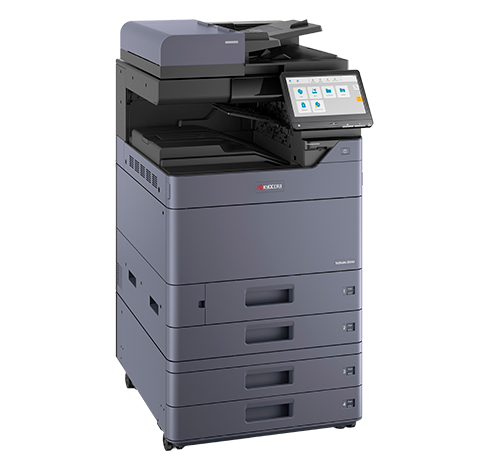
A small office suits a desktop multifunction printer, while a busy commercial site suits a larger A3 model built for higher page volumes, with optional finishing.
Office printers for lease come from Kyocera, HP and Toshiba, with Brother also available.
Tell us your monthly page volume and we will quote the right device.
Get a Volume Based Quote
A quote request takes about two minutes.
It asks for roughly how many pages the office prints each month, not just how many desks there are.
We reply the same business day, Monday to Friday.
A device recommendation and a figure confirmed in writing follow for that volume.
Once a confirmed lease order is in place, installation typically happens within 10 business days.
We work Australia wide, so a five person office in a regional town gets the same process as one in a capital city.
Office Printer Lease Cost in Australia
From $160
per month ex GST
36 to 60 month term
custom quoted above that
All inclusive
maintenance and toner
Next Business Day
onsite service response
All leases include maintenance, toner, repairs, and onsite service for businesses. Terms run 3 to 5 years. There are no per page charges: the only thing you buy is paper.
▶Full lease summary
- Per page chargesNone. You only buy paper
- Lowest monthly figure60 month term
- Term options36 to 60 months
- Onsite response timeNext business day
Total cost is quoted by your finance provider and varies by term and equipment selected.
According to LeasemyPrinter · Data current: March 2026
How it works
Size to the typical month, check the busy one
Staff numbers are a rough guide. Monthly page volume is the real one, and the busiest month is what tells you whether the device has room to breathe.
How it works
Which monthly cost band fits your office?
The Australian printer lease market sits in four broad monthly bands (ex GST, all inclusive). Find the band that matches your team and volume, then get a tailored quote. Figures are indicative market benchmarks, not LeasemyPrinter quotes.
- A4 mono MFPfrom $80 to $150
1 to 5 staff, under 1,000 pages per month
Market band - A4 colour MFPfrom $150 to $220
5 to 15 staff, 1,000 to 3,000 pages per month
Market band - A3 colour MFPfrom $220 to $320
10 to 30 staff, 3,000 to 8,000 pages per month
Market band - A3 colour high volumefrom $320 to $500+
30+ staff, 8,000+ pages per month, finishing options
Market band
Indicative market benchmarks. They describe the wider market and are not LeasemyPrinter quotes.
All inclusive bands assume the lease bundles equipment, scheduled service, parts and toner consumables.
Your formal quote depends on the device, term, monthly page volume and finance provider.
Estimate your monthly lease cost
A4 mono entry tier lease from $160 a month ex GST per device, on a 36 to 60 month term.
Toner, parts, service labour and call outs are included in the monthly fee, so the only thing you buy is paper.
A4 colour, A3 colour and multi device fleet pricing requires a tailored quote.
Want an exact figure for your office? We will tailor the quote to your equipment, term, and volume.
Get an exact quoteGet this estimate priced for your office
We'll turn your inputs into a written lease quote for your office, sent the same business day, Monday to Friday.
No obligation · 5 stars from 153 verified Google reviews.
Indicative only.
Not a quote.
A formal quote requires confirmation of device, term, monthly volume and finance provider.
Lease side shows the published entry tier base × your device count.
Buy side shows hardware amortisation plus your service contract input.
Toner and consumables are included in the lease; on the buy side they are your own costs, not estimated here.
Useful life default follows the ATO effective life schedule (Income Tax (Effective Life of Depreciating Assets) Determination 2025).
*Check with your accountant.
Lease tax treatment varies by business structure, turnover and current ATO rules.
See our Privacy Policy for how we handle any details you submit with your quote request.
Ready to Cut Your Printing Costs?
Request your personalised quote in under 2 minutes. No obligation.
Why Choose LeasemyPrinter?
- Latest technology
- Full service included
- 3 to 5 year lease terms
- Australian based support team
- Next day response
- From $160 a month ex GST on a 36 to 60 month term
Not sure which printer suits your office?
Answer 12 quick questions about your print volume, colour needs and budget.
The free quiz takes about 2 minutes and matches you to one Kyocera printer with an estimated monthly cost. Other brands we lease are quoted on request. No obligation.
Key Points About Printer Leasing in Australia
- •
Monthly cost from $160 a month ex GST on a 36 to 60 month term, with no upfront capital outlay required
- •
Included: device, installation, maintenance, genuine toner, parts, and priority support are bundled into one monthly payment.
You only buy paper.
- •
Lease terms run 36 to 60 months, with technology upgrades available at the end of the term
- •
Same business day phone and remote support , Mon to Fri, 8.30am to 7.00pm AEST.
Onsite service is dispatched from our Nerang QLD head office, with next business day onsite response for confirmed service requests
- •
Free quote requests take under 2 minutes, with no obligation
Source: LeasemyPrinter Australia
Common Questions About Printer Leasing
What size printer does an office of our size need?
Staff numbers are a rough guide but monthly page volume is the real one.
A team of five producing 800 pages a month needs a different device from a team of five producing 8,000.
Quoting starts from your output, not your headcount.
How much does an office printer lease cost?
Office printer leasing starts from $160 a month ex GST on a 36 to 60 month term.
Toner, parts, service labour and call outs are inside that figure, so the only print cost the office adds on top of the lease is paper.
Is it better to lease or buy an office printer?
Buying suits a business with steady low volume that plans to keep a device for many years.
Leasing suits one that wants no capital outlay, service and consumables handled, and the option to move to newer equipment at the end of the term.
Can one printer serve the whole office?
A single shared multifunction device covers most small and mid sized offices, handling printing, copying and scanning for everyone.
Larger workplaces often add a second device on another floor or in a busy department to avoid queues at one machine.
Do you handle installation and setup?
Yes.
The device is delivered, positioned, connected to the network and tested, with user accounts and scan destinations configured as part of the install.
Your team is shown how to use the functions they will actually need day to day.
What if we move offices during the term?
Relocations are common and are arranged rather than penalised.
Tell us ahead of the move so the device can be disconnected, transported and reinstalled properly, and so the service record follows the equipment to the new address.
Are there charges beyond the monthly payment?
Paper is the running cost the business buys.
The monthly payment covers the equipment, toner, parts, service labour and call outs, and there is no page allowance or per page rate that could add a variable line to the invoice.
Is a business or commercial printer lease different from an office printer lease?
The agreement is the same: a 3 to 5 year term with toner, parts, service labour and call outs in one set monthly payment.
What changes is the machine, which we size to how many pages your business prints each month.
Ready to get started?
Request Your Free Quote in under 2 minutesPricing an office printer against other offers?
Office printer quotes rarely match on speed, sheet size or inclusions. Give us the monthly page volume and staff count you told the others and we will price to that.
Get your printer leasing quote
Printer leasing terms explained
Why Businesses Choose LeasemyPrinter
- ✓Latest printer technology
- ✓Full service support included
- ✓3 to 5 year lease terms
- ✓Australian based support team
- ✓Next business day response
- ✓From $160 a month ex GST on a 36 to 60 month term, all inclusive (toner, parts, service)
Get a Fast Quote
No obligation. The quote form takes under 2 minutes. Equipment, installation, maintenance and toner included.
Get My Free Quote1300 873 460Explore Printer Services
Find It Near You
Browse Printer Leasing by State
Get in Touch

Cyrus Dickie
Founder, LeasemyPrinter (Global Document Solutions Pty Ltd)
You deal with the founder directly, from first quote to ongoing support, since 2010.
Send your details and deal with him directlyAuthored by Cyrus Dickie, Founder at LeasemyPrinter (Global Document Solutions Pty Ltd). In the industry since 2010.