Secure Office Printer Lease: What to Ask and Set
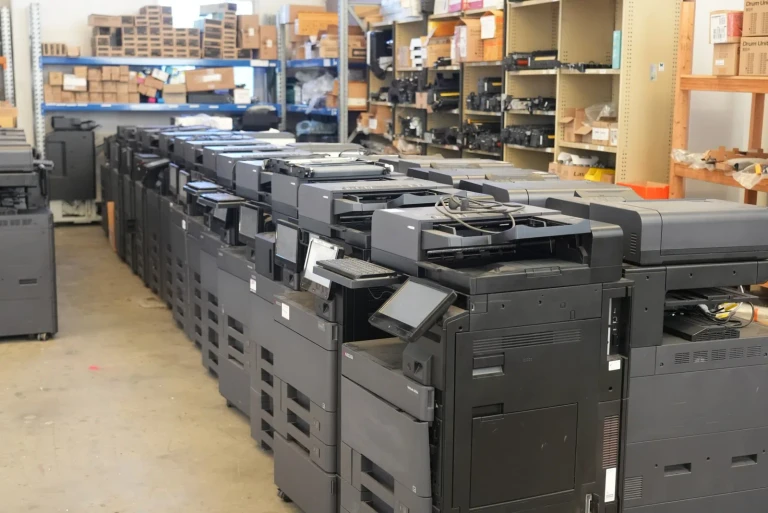
A copier left on factory settings can hold confidential client files and passwords that nobody thought to protect.
A modern copier stores what your staff scan and print. Five settings close the gap.
Toner, parts and service are included in a lease, so you only buy paper.
Before you enquire
How long am I locked in for?
Agreements run 36 to 60 months, with no shorter option available.
The length within that range is your decision before anything is signed rather than ours afterwards.
Am I stuck with the equipment at the end?
You choose between three paths: move to a newer machine on a fresh agreement, continue on the equipment already in place, or hand it back.
Each one is priced and confirmed in writing before it starts.
Can I change device partway through?
Volumes rarely stay still, so the agreement allows a change of device once the swap is re priced and confirmed in writing.
Delivery is within 10 business days of a confirmed lease order, and installation is part of it.
Are we too small for this to be worth it?
If you print more than around 500 pages a month, an all inclusive lease is typically simpler to budget for.
It replaces a desktop inkjet plus cartridges and unplanned service callouts.
Maintenance, genuine toner and remote diagnostics are included in one monthly set plan for the contract term.
We are mid contract with another supplier. Is it worth asking?
Yes.
Being mid term does not stop us quoting.
The new installation is timed to your existing end date so the two never overlap, and we will map the changeover with you.
Notice windows are the part most often missed, so check yours early.
Enquired on Monday and had a printer installed by Friday. Fast, easy, and exactly what we needed.
Printer data security: get your printer lease quote
To make an office printer more secure, use PIN or card release, keep its firmware updated and change the admin password.
Encrypt and wipe its storage, and keep it on its own network segment.
Ask for all five in writing when you compare secure office printer lease quotes.
Why printers are now part of your data security
A multifunction printer prints, scans and copies.
It holds a network connection, user address books, email settings and, on many models, an internal drive of scanned and printed jobs.
A printer is a network endpoint, a device connected to the network like a laptop.
An unpatched device, one missing its security updates, can be a way in.
The Office of the Australian Information Commissioner (OAIC) received 1,205 notifiable data breach notifications in 2025.
Malicious or criminal attacks were the largest source.
Uncollected printouts are a simpler risk: a payroll report or client file left in the tray can be read by anyone who walks past.
The same payroll report, printed two ways
Secure print release is the first of the five settings. It keeps a page off the tray until the person who sent it is standing at the printer.
Without release
- Sent from a laptop
- Prints straight away
- Sits in the tray
- Anyone can pick it up
With secure print release
- Sent from a laptop
- Held in the queue
- Owner taps card or PIN
- Printed in front of them
Five settings that close the gap
Secure print release: nothing prints until the sender is standing at the device with a card or a PIN.
The trade off is one extra step at the printer for staff.
The benefit is that no page waits in the tray for someone else to read.
Firmware updates: a current firmware version fixes known weaknesses, so set a schedule rather than waiting for a fault.
Admin password: replace the factory default password on the web control panel on day one.
Storage encryption and wipe: encrypt the internal drive and confirm how it is wiped when the device leaves your office.
Network separation: place printers on their own network segment and turn off connection methods (protocols) your office does not use.
Working through this now? We can map the timeline with you.
What to ask before you sign a lease
Does the model support PIN or card release, and is it set up at install?
Who applies firmware updates during the term, and how often?
How is the internal storage wiped or removed at the end of the lease, and will you receive written confirmation?
Can scan to email and scan to folder be set up without sharing a personal email password on the device?
Put the security terms in the lease
Ask each provider which firmware policy applies to the model you lease, and get the answer in writing.
Agree in writing who checks firmware and settings during the term, and how often.
Before you sign, ask how the storage is wiped at return, and get the answer in writing.
What happens if you wait
- An older printer near the end of its maker updates stays exposed for as long as it stays on the network.
- Default passwords and open protocols can be left in place from the original install.
- It is easier to build security into a new lease than to fix it after a problem.
How many gaps does your printer have?
Tick each setting your current printer already has. Nothing is saved or sent.
0 of 5 settings in place
5 gaps to close
Every unticked setting is a question to put to any provider, in writing, before you sign.
Interactive · Plan your changeover
Plan back from your date
Pick your date and we will show how much runway you have to get the right printer in place without a last minute rush.
- 1
Today
You start here.
- 2
Request a quote
The quote form takes under 2 minutes.
- 3
Choose & sign
Pick the device that fits and sign the lease.
- 4
Delivery & install
Installation scheduled to land before your date.
Ready to plan your secure office printer lease?
Request a tailored quote in under 2 minutes.
Request your secure office printer lease quote
Frequently asked questions
Can an office printer really be hacked?
Yes.
A networked multifunction printer runs its own software and stores data.
An unpatched or poorly configured device can expose documents or give access to the network.
Current firmware, a changed admin password and network separation reduce that risk.
What is secure print release?
Secure print release parks every job on hold.
It prints only once its sender taps a card or keys in a PIN at the device.
Sensitive pages do not sit in the output tray.
What happens to the data on a leased printer when it is returned?
Many multifunction printers keep data on internal storage.
Before you sign, ask how that storage is wiped or removed at the end of the lease.
Request written confirmation when the device is collected.
What does a secure printer lease cost?
Entry tier devices lease from $160 a month plus GST on a 36 to 60 month term.
The set monthly payment covers the equipment, toner, parts, service labour and call outs.
You only buy paper.
Not ready for a quote yet?
Book a time for us to call you, or read the buyer's guide first.
Print security and procurement: the numbers behind a smarter print lease
Independent, sourced data on why a managed, single vendor print fleet matters and how the lease versus buy decision is treated for tax.
Each figure links to its source.
Australian businesses are small
97.4%
Of Australia's 2,814,778 actively trading businesses were small businesses with fewer than 20 employees at 30 June 2026.
Read the detailHide the detail
Small businesses are the segment a printer lease is built for.
A lease trades a large upfront purchase for a predictable monthly cost.
According to Australian Bureau of Statistics · ABS Counts of Australian Businesses, 30 June 2026 (n = 2,814,778)
Print related data loss
56%
Of organisations reported at least one print related data loss in the past year.
Read the detailHide the detail
An unmanaged printer stores and routes confidential documents.
For medical, legal, accounting and local government offices, that is a genuine exposure.
According to Quocirca Print Security Landscape 2025 · Quocirca, July 2025. International survey of 400 IT decision makers (US and Europe)
ATO instant asset write off, permanent from 1 July 2026
$20,000
If you bought equipment outright, the write off applied to eligible small businesses with an aggregated annual turnover under $10 million.
Read the detailHide the detail
The write off covered the business portion of eligible assets costing less than $20,000.
The asset had to be first used, or installed ready for use, between 1 July 2025 and 30 June 2026.
The 2025 to 2026 window has closed, and the same threshold continues from 1 July 2026, made permanent by legislation passed in August 2026.
Check your eligibility at ato.gov.au.
Genuine operating lease payments are instead deductible as a business expense each period.
General information, not tax advice.
Confirm the right structure for your situation with your accountant.
According to Australian Taxation Office · Australian Taxation Office, updated 27 August 2026